Try Git AI with Your Team
Evaluate Git AI by testing locally, rolling it out to a small group, and reviewing the results on your dashboards.
Local evaluation
Install Git AI and test it out with the agents you use.
Test this locally in under 10 minutes.
Install Git AI on a single machine:
curl -sSL https://usegitai.com/install.sh | bashOpen a project and use 2–3 coding agents from the team's normal workflow — Cursor, Claude Code, Copilot, or any other supported agent. Generate some code, then commit.
After the commit, run git-ai blame on a file the agent touched:
git-ai blame src/example.tsEvery line the agent wrote is attributed to that agent and model. Every line typed by a human is attributed to the human.
Test History-Rewriting Operations
Try some history rewriting operations, you'll see Git AI preserves the AI attributions even when you change Git history:
git rebase maingit cherry-pick <sha>git commit --amendgit add -p(partial staging)
Run git-ai blame after each one. Attribution survives all of them.
Rollout to a Few Engineers
10–20 engineers, 1–3 repositories, 2–4 weeks.
Install via the standard install or a team-specific method. The goals: confirm Git AI does not get in the way, and verify the data is accurate.
Git AI runs as a transparent git proxy — developers prompt and commit as usual. There are no workflow changes, no new commands to learn, and no per-repo setup. The commit stats bar appears after each commit, showing the AI/human split:
you  ██░░░░░░░░░░░░░░░░░░░░░░░░░░░░░░░░░░░░░░ ai
     4%                                   96%
     100% AI code accepted | waited 33s for ai
Developers can spot-check accuracy at each commit or by running git-ai blame on files they just worked on — the attribution should match what they saw the agent write.
After the pilot group has been committing for 1–2 weeks, review the Git AI for Teams dashboards. They populate automatically.
AI Usage
Does the percentage of AI code match expectations? Teams using agents heavily typically see 40–70% AI-authored code.

| Metric | What to check |
|---|---|
| % AI-assisted PRs | Does this match how often the team uses agents? |
| % AI code | Is this consistent with what developers self-report? |
| Merged AI code (week) | Is the trend increasing as adoption grows? |
Contributor Metrics
Per-developer breakdowns reveal adoption patterns. Look for outliers — developers who are not showing AI usage despite using agents may have a configuration issue.
Next Steps
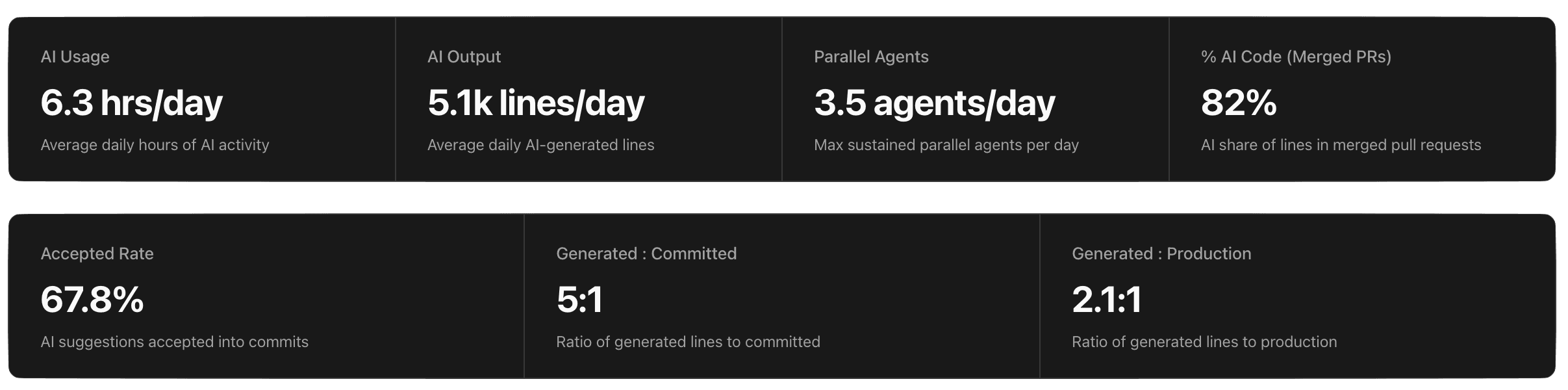
After the PoC, the dashboards provide real data on AI adoption, agent usage, and code quality across the pilot group.
To deploy org-wide, the MDM Deployment guide covers enterprise rollout — distributing the binary, configuring PATH, and deploying settings across a fleet.
The Git AI team is available to help with deployment planning and onboarding. Schedule a call with the core maintainers.